February Ornament: The Perfect Script Font for Handmade Holiday Products
As a small shop owner who spends hours designing labels, cutting vinyl for signs, and creating digital printables, I know that the right typeface can make or break a product. You want something that looks magical but remains legible enough for customers to read quickly. That is exactly why I love February Ornament. This festive and playful script font from the Script Amp collection brings an enchanting touch of holiday magic to any project. Whether you are crafting physical goods or selling digital downloads, this commercial font offers the charm needed to elevate your brand identity.
Bringing Holiday Charm to Your Craft Projects
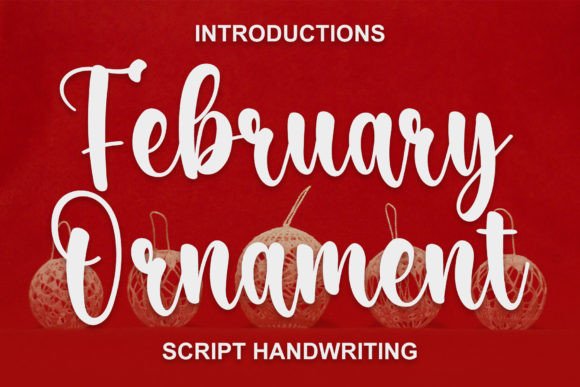
When you open your design software to create a new product line, you need a font that instantly sets the mood. February Ornament is adorned with enchanting swashes that give it a whimsical, hand-lettered feel without sacrificing structure. It is not just another generic script; it has personality. When used on Christmas cards, gift tags, or seasonal decorations, it adds a layer of warmth that standard fonts simply cannot achieve. The flowing strokes mimic the look of calligraphy done by hand, which resonates deeply with buyers looking for authentic, handmade items.
I have found this display font particularly effective for short phrases where impact matters most. Imagine using it for a "Merry Christmas" header on a custom mug or as the main title on a boutique tag. The decorative elements draw the eye immediately, creating an emotional connection before the customer even reads the details. It transforms a plain product into a curated experience. Because it is designed with such attention to detail, it works beautifully for both traditional paper crafts and modern digital assets like SVG files for Cricut or Silhouette machines.
Practical Applications for Labels, Stickers, and Packaging
One of the biggest challenges in handmade business is balancing aesthetics with readability. A font might look stunning on a large poster, but does it work on a tiny sticker? February Ornament strikes a wonderful balance. Its letterforms are distinct and open, making it highly readable even at smaller sizes when printed on product packaging or labels. I frequently use it for candle labels, soap tags, and bakery boxes where the font needs to convey quality and care.
- Product Labels: Use the font for the brand name or product type on jars and bottles. The swashes add a premium feel that suggests high-quality ingredients.
- Sticker Sheets: Create festive designs for planners or laptops. The playful nature of the modern typography makes these stickers stand out in a sea of plain options.
- Invitations and Stationery: From wedding welcome boards to birthday party invites, this handwritten font style creates an inviting atmosphere that guests appreciate.
- Apparel and Merchandise: Print it on tote bags, t-shirts, or aprons. The bold yet elegant strokes ensure the text doesn't get lost against fabric textures.
For those selling digital downloads, this font is a versatile asset. You can bundle it with other design elements to create printable wall art, planner pages, or social media graphics templates. The versatility allows you to maintain a consistent visual theme across all your products, which is crucial for building a recognizable brand identity.
Readability and Cutting Machine Considerations
If you are preparing files for vinyl cutting or laser engraving, legibility is paramount. While February Ornament is full of character, it shines best when used for titles, names, and short slogans rather than long paragraphs of text. For body copy, it is always best to pair it with a clean, simple font. When cutting intricate swashes, remember to check your machine settings to ensure fine details are captured correctly. If you are creating SVGs for sale, test the cut paths thoroughly to guarantee that the delicate flourishes do not separate unintentionally during production.
For small product labels, such as those for tea bags or spice jars, consider adjusting the tracking (letter spacing) slightly. This prevents the swashes from overlapping too much, ensuring the text remains crisp when printed. Mockups are your friend here; always preview your design at actual size before sending it to print. This step helps you avoid costly mistakes and ensures your final product looks professional.
Mastering Font Pairing for Professional Results
To truly maximize the appeal of February Ornament, pairing it correctly is essential. A common mistake is using two busy scripts together, which can result in a cluttered and hard-to-read design. Instead, let February Ornament be the star. Pair it with a clean sans serif font for secondary information like addresses, ingredients, or event details. The contrast between the ornate script and the structured sans serif creates a modern, balanced look that feels intentional and sophisticated.
Alternatively, you can pair it with a classic serif font for a more traditional, vintage aesthetic. This combination works exceptionally well for farmhouse-style decor, antique-looking signage, or formal wedding stationery. The key is to let the February Ornament handle the emotional weight of the design while the supporting font provides clarity. This strategy ensures that your message is communicated effectively while still maintaining the festive spirit.
Exploring Styles and Technical Features
Before downloading, take a moment to explore the included styles within the February Ornament family. Look for alternate characters, ligatures, and additional swash options. These features allow you to customize your text to fit specific design constraints. For instance, if you need to adjust the height of a word to fit a circular label, an alternate character might provide the perfect solution. Checking for multilingual support is also wise if you plan to sell internationally, ensuring your designs remain accessible to a global audience.
The file formats provided should include standard OTF, TTF, and potentially web font formats, giving you flexibility for various projects. Whether you are working in Adobe Illustrator, Canva, or Procreate, having access to a robust set of glyphs means you can execute complex layouts with ease. The inclusion of diverse stylistic sets empowers you to tweak the look of individual letters, adding a level of customization that generic fonts lack.
Licensing and Commercial Use for Creators
As a creator selling physical goods, printables, or digital downloads, understanding licensing is non-negotiable. February Ornament is designed to be a practical tool for commercial projects, but you must always verify the specific terms of the license you purchase. Typically, a commercial license allows you to use the font in logos, product packaging, marketing materials, and client work. However, there are often restrictions on redistributing the font file itself or embedding it in apps without proper authorization.
Always review the end-user license agreement (EULA) to ensure you are compliant. This protects your business from legal issues and respects the intellectual property of the type designer. With the correct license, you can confidently use February Ornament to create endless variations of holiday ornaments, seasonal greetings, and branded merchandise. It becomes a reliable part of your workflow, helping you produce high-value content that customers love.
In the world of handmade crafts, the details matter. A well-chosen creative font can turn a simple item into a cherished gift. February Ornament delivers the festive flair and professional polish needed to succeed in today's competitive market. By integrating this premium font into your designs, you are not just printing text; you are crafting an experience that resonates with the joy of the season.